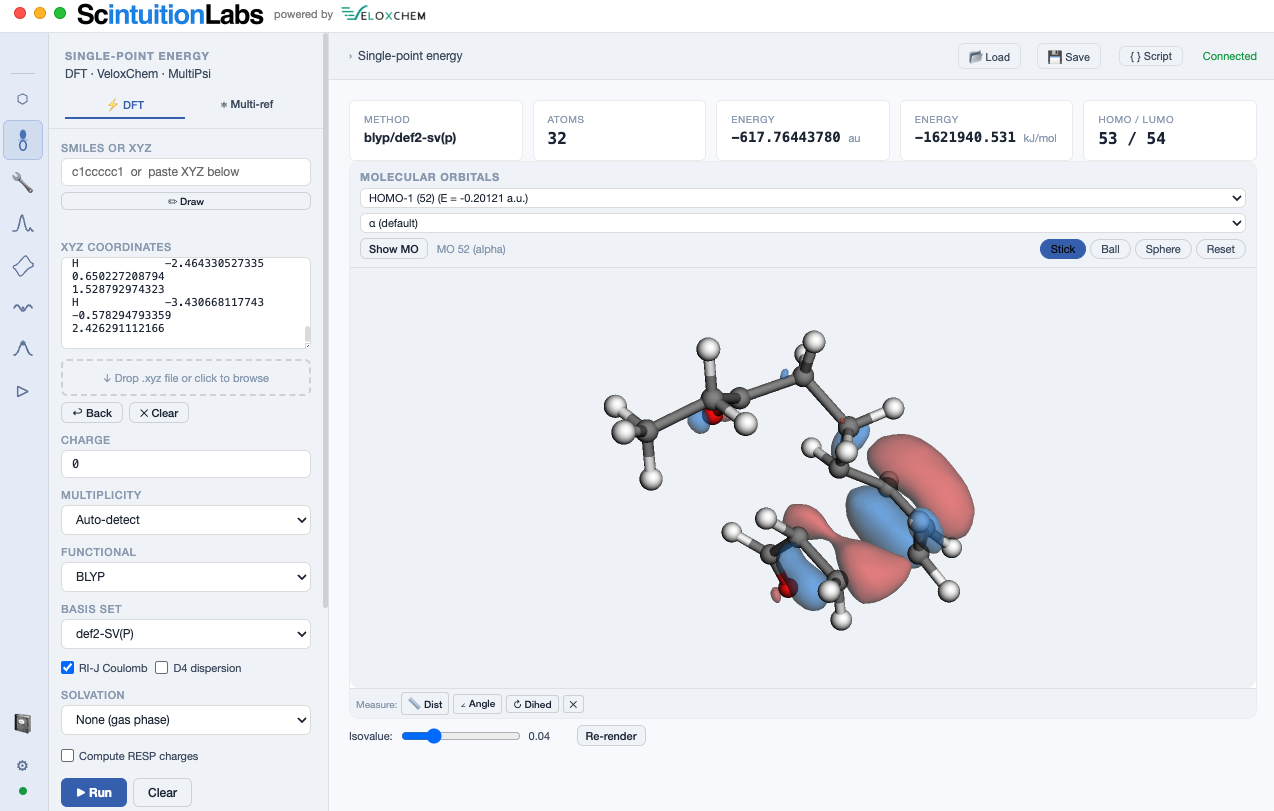
The main window: module icons on the far left, the settings panel for the current module, and the results area.
The window has three parts.
The module bar on the far left has one icon per module: builder, geometry optimisation, single point, spectra, transition state, molecular dynamics and any add-on modules in your edition. Settings sits at the bottom.
The status light at the top right shows what the calculation engine is doing:
| Light | Meaning |
|---|---|
| ⚪ Starting… | the engine is starting, which takes up to a minute on the first launch |
| 🟢 Ready | ready to run a calculation |
| 🔵 Running | a calculation is running |
| 🟠 Restarting… | the engine is restarting |
| 🔴 Restart backend | the engine has stopped. Click the light to restart it |
The light is about the calculation engine on your computer, not your internet connection.
The settings panel shows the input for the current module: the molecule, the method, and a Run button. Most modules also have a Queue button (Premium), which adds the job to the job queue instead of running it now.
The results area shows the 3D structure, energies, plots and a log. The buttons along its top are:
| Button | What it does |
|---|---|
| Load / Save | Save the module’s settings and every result it has produced this session to one file, or open such a file again |
| Script | Export what you ran as a Python script for VeloxChem (Premium; geometry, single point, spectra, transition states, MD) |
| Cite | The references to cite for what you have run, in ACS format or as BibTeX |
| Previous | Browse calculations you have already run on this molecule (Premium) |
Entering a molecule
Every module that takes a molecule accepts it in the same ways:
SMILES, typed or pasted, such as
CCOfor ethanol. A 3D structure is generated for you. A metal complex (one d-block metal bonded to its ligands in one SMILES) is built on an idealised coordination geometry with realistic metal–ligand distances, and chelating ligands bind with all their donors. Bonds may be written as ordinary bonds (N[Pt](N)(Cl)Cl) or as dative bonds ([NH3]->[Pt+2](<-[NH3])(<-[Cl-])<-[Cl-]). Give cis/trans with RDKit’s square-planar and octahedral tags:N[Pt@SP1](N)(Cl)Clis cis,N[Pt@SP2](N)(Cl)Clis trans. Without a tag, the isomer is not controlled. A complex written as separate pieces with dots (N.N.Cl[Pt]Cl) is not assembled; draw the bonds, or use the Builder.XYZ coordinates: press Paste XYZ, or load an
.xyzfile. Use this when you already have a good geometry, for example from an earlier optimisation. Any file button that takes.xyzalso reads Molfile/SDF, MOL2, PDB, CML, Molden, cube files, the inputs and outputs of common quantum chemistry programs (the last geometry of an output), and CDXML (.cdxml) drawings. A drawing is 2D, so a 3D structure is built from it; if it holds several structures, the first is used. Binary.cdxcannot be read: save it as ChemDraw XML (.cdxml) in ChemDraw.Draw: opens a structure editor. The structure you draw is converted to SMILES.
You can also send a structure from one module to the next. Buttons such as → Geomopt, → SP energy and → IR spectrum under a result pass the current geometry on, so you do not have to copy coordinates by hand.
Charge and multiplicity
Set the charge for ions. Multiplicity defaults to Auto-detect: singlet for an even number of electrons, doublet for an odd number. Set it by hand for triplets and for open-shell metal complexes. See Open-shell molecules and SCF convergence.
Time and memory estimates
Before a DFT single point, optimisation, UV/vis, IR or transition-state search starts, the log shows an estimate of how long it will take and how much memory it needs. A job that may take more than 30 minutes, or may not fit in the free memory, asks before it starts.
The estimate is learned from the calculations you run on your own computer. At first it uses built-in values and gives a wide range. It narrows once the program has timed a few jobs of the same kind. The number of optimisation steps cannot be known in advance, so optimisations always give a range. xTB and AIMNet2 jobs are fast and get no estimate.
If the calculation engine has grown large, for example after many molecular-dynamics runs, the program offers to restart it. Some libraries do not return all of their memory when a job finishes, and a restart frees it. Results already on screen are kept.
Atom numbering
Wherever you are asked for atom numbers (bonds to break, scan coordinates, constraints), they are 1-based and follow the order of atoms in the structure. Use the Show numbering or Labels button in the viewer to display them.
The viewer
Drag to rotate, scroll to zoom, right-drag to move.
Stick, Ball, Sphere: drawing styles. Reset recentres the view.
Dist, Angle, Dihed: click two, three or four atoms to measure them.
↓ XYZ saves the structure; Image saves a picture.